Getting started
Install Winslow, write a two-task workflow, run it on your laptop, then serve the same directory for other terminals. The page ends with the workflow options and the trust model.
Install
Winslow needs Python 3.12 or later. Each mode installs one extra, shown with the mode in the quick start:
| extra | adds |
|---|---|
winslow[tui] |
the terminal UI on one machine, winslow run |
winslow[serve] |
the server, winslow serve, see Serve and connect |
winslow[connect] |
the remote terminal, winslow connect, or uvx --from "winslow[connect]" with no project |
winslow[mcp] |
the server with its MCP endpoint |
winslow[sentry], winslow[otel] |
error telemetry, see Telemetry |
For a headless run in cron or CI, the winslow package alone is sufficient.
Quick start
A workflow is a directory. It holds a Workflow class and the Task classes that belong to that workflow.
The filename workflow.py marks the directory as a workflow package. Every .py file beside it belongs to
the same workflow.
Put this content in workflows/etl/workflow.py:
from pathlib import Path

from winslow import Workflow, Task

RAW = Path("raw.txt")
CLEAN = Path("clean.txt")


class Etl(Workflow):
    pass  # The name defaults to "etl", the kebab-cased class name.


class DownloadData(Task):
    def run(self):
        RAW.write_text("oslo 4\nlisbon 17\n")

    def check(self):
        return RAW.exists()


class TransformData(Task):
    dependencies = DownloadData

    def run(self):
        warm = [ln for ln in RAW.read_text().splitlines() if int(ln.split()[1]) > 10]
        CLEAN.write_text("\n".join(warm))

    def check(self):
        return CLEAN.exists()
Project layout
The example holds the workflow and the tasks in one file, which keeps it short. A real workflow puts the
tasks in their own files beside workflow.py. Winslow imports every .py file in the directory. See
Workflows.
Run it on your laptop
Start the terminal UI from that directory:
The dashboard lists the etl workflow. Start it, and the workflow screen shows the two tasks change state as
they run. Run the workflow a second time from the same screen. Winslow runs neither task, because check()
already returns true.
A headless run takes the workflow name and runs it to the end:
Serve the same directory
The same workflow can run on a shared machine, where anyone on the team connects to it from their own terminal. Install the server on that machine:
Serve the directory:
The server listens on 127.0.0.1:8866. A terminal needs no project and no install, one command connects:
You get the same dashboard as winslow run, and everyone connected sees the same sessions. A machine
that connects often can add winslow[connect] to a project and run winslow connect from there.
Pass options to a workflow
A workflow declares its runtime options with ConfigOption. Each option becomes a command line argument. A
task reads the values from self.workflow_config.
from pathlib import Path

from winslow import Workflow, Task, ConfigOption


class Report(Workflow):
    region = ConfigOption(
        type=str,
        required=True,
        choices=["eu", "us"],
        help_text="The region to report on.",
    )
    limit = ConfigOption(type=int, default=10, help_text="The maximum row count.")


class WriteReport(Task):
    @property
    def output_path(self):
        return Path(f"report-{self.workflow_config.region}.txt")

    def run(self):
        self.output_path.write_text(f"rows: {self.workflow_config.limit}\n")

    def check(self):
        return self.output_path.exists()
Pass each value on the command line:
An option name uses an underscore in Python and a dash on the command line. The option max_rows thus becomes
--max-rows.
The region option is required. Winslow stops before it runs a task if the command omits the value:
The limit option has a default, so the command can omit it. The choices list is also enforced:
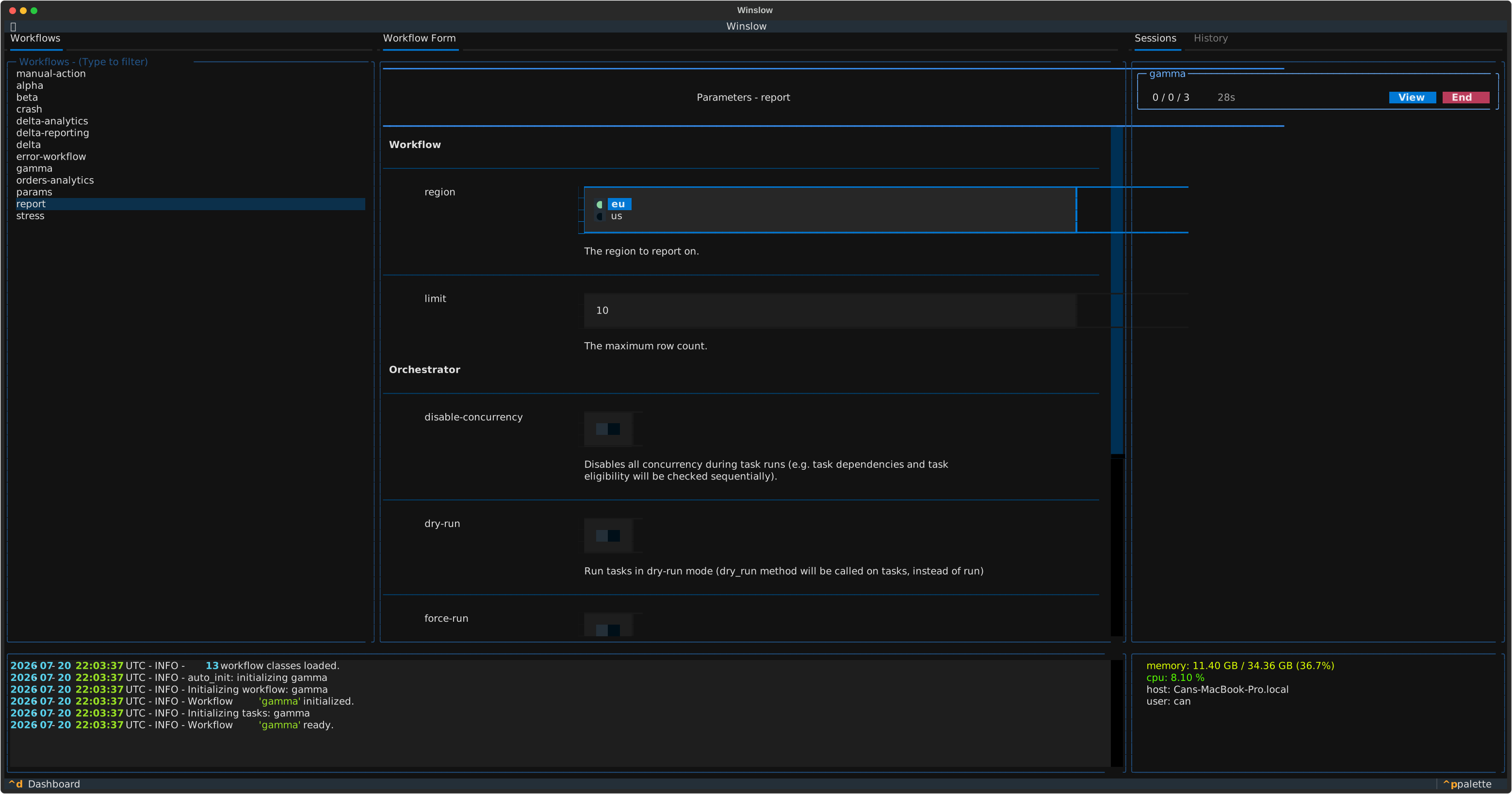
The terminal UI presents the same options as a form. Fill the form in, then start the workflow.
The environment
The environment name is the ENV setting, local by default. A settings module
sets it, from an environment variable or as a constant. A task and a workflow both read the
value from self.env.
Trust model
Winslow runs the code in the directory that you start it from
Treat a workflow directory like a Makefile or a conftest.py. Start Winslow only in a directory that
you trust.
At startup Winslow searches the current directory and every subdirectory below it for a workflow.py file. It
then imports each workflow.py file, every other .py file in the same directory tree, and the top-level
modules for the orchestrator discovery. Winslow ignores a directory whose name starts with a full stop or an
underscore. These imports happen before the first prompt.
A serve credential grants the same on the serving host: a connected terminal or agent starts sessions, which runs the project code there. A plugin loads only when the settings module lists it. The security policy describes the full trust model and the report process for a vulnerability.