UI plugins
A UI plugin extends the terminal UI without a fork. The UI is a set of named slots, and every pane in it is a plugin that fills one slot. The built-in panes use the same mechanism, so a third-party plugin can sit next to them, come before them, or replace one of them.
A UI plugin ships in a plugin package with an entry point in the winslow.tui_plugins group (see
How Winslow finds a plugin).
Write a UI plugin
A plugin declares a slot and a label, and builds one widget:
from textual.containers import Center
from textual.widgets import Static

from winslow.ui.plugin import Slots, UIPlugin


class SampleWidget(Center):
    def compose(self):
        yield Static("Hello from sample plugin!")


class SampleDashboardPlugin(UIPlugin):
    slot = Slots.DASHBOARD_WORKFLOWS
    label = "Sample"

    def create_widget(self, context):
        return SampleWidget()
create_widget returns any Textual widget. The context argument carries the state of the screen: the
client and the value shapes it returns (see the payload rule):
| The screen | The context | The useful attributes |
|---|---|---|
| Dashboard | DashboardRenderContext |
client (the AppClient), descriptors |
| Workflow | WorkflowRenderContext |
client, session, snapshot, roster, task_statuses |
| Task info modal | TaskDetailRenderContext |
info, logs, client, task_key, root_dir, snapshots |
| Confirmation modal | WorkflowConfirmationRenderContext |
workflow (the workflow name), form_values |
The workflow context attributes:
client: theSessionClientof the session. It serves every read (roster(),history(),caches(),task_detail(task_key), ...) and accepts every action throughsubmit(action).session: theSessionInfovalue: display name, instance name, status, the task status summary.snapshot: theSessionSnapshotat compose time: task statuses by identity key, batch rows, the session log backlog, the cache names.roster: one stubTaskInfoper task, in launch-filter order.task_statuses: the{key: TaskStatus}mapping that the screen maintains.
info is a TaskInfo value. The task detail context opened from a history row also carries the
captures of that batch:
transient_snapshots and cache_snapshots, each a mapping from the phase name to the values the
phase recorded.
A slot with one plugin shows the widget directly. A slot with two or more plugins becomes a tab bar, and
label names each tab. When one slot of a row becomes tabbed, the other slots of that row become tabbed
too, so the row keeps one visual line.
The payload rule
A render context, a Textual message and a session bus event carry values: the identity key of the task
(Task.identity_key, a stable string), TaskInfo captures, and the model dataclasses of
winslow.model. A pane reads through the context client and never holds a live core object. A pane
built this way works the same on a remote client, because every payload can cross a process boundary.
The screen posts each message to the pane it concerns (bubble=False), and the handler on that pane
receives it.
The messages of the workflow screen:
| The message | The payload |
|---|---|
TaskStatusChanged |
key, status |
ExecutionStatusChanged |
batch_uuid, task_key, status |
TaskLogUpdated |
batch_uuid, task_key, line |
BatchCreated, BatchCompleted |
info (a BatchInfo value) |
TaskSelected |
task_info (a TaskInfo value) |
CacheSelected |
card (a CacheInfo value) |
CacheUpdated |
none: the pane repaints from a fresh caches() read |
SessionEnded |
none: the session is archived, and a pane stops its timers |
A pane keys its rows by the identity key, and it reads the current statuses from
WorkflowRenderContext.task_statuses, the {key: TaskStatus} mapping that the screen maintains:
class StatusBoardPlugin(UIPlugin):
    slot = Slots.TASKS_PANE
    label = "Status Board"

    def create_widget(self, context):
        return StatusBoard(statuses=context.task_statuses)


class StatusBoard(Widget):
    @on(TaskStatusChanged)
    def refresh_row(self, event):
        self.rows[event.key].status = event.status
A pane that needs more than its messages carry reads through the client, for example
context.client.task_detail(task_key) for the full capture of one task, or
context.client.submit(RunTasks(keys=(key,))) for an action. Every client method takes values and
returns values, so the same pane renders a local session and a remote one. This pane lists the
roster, follows the status messages, and runs the highlighted task through the client:
from textual import on
from textual.containers import Vertical
from textual.widgets import Button, Label, ListItem, ListView

from winslow.actions import RunTasks
from winslow.ui.plugin import Slots, UIPlugin
from winslow.ui.workflow_events import TaskStatusChanged


class RunnerPlugin(UIPlugin):
    slot = Slots.TASKS_PANE
    label = "Runner"

    def create_widget(self, context):
        return Runner(context.client, context.roster, context.task_statuses)


class Runner(Vertical):
    def __init__(self, client, roster, statuses):
        super().__init__()
        self.client = client
        self.roster = roster
        self.statuses = dict(statuses)

    def compose(self):
        yield ListView(*(ListItem(Label(self.line(info))) for info in self.roster))
        yield Button("Run highlighted", id="run")

    def line(self, info):
        return f"{info.label}  {self.statuses[info.key].value}"

    @on(Button.Pressed, "#run")
    def run_highlighted(self):
        info = self.roster[self.query_one(ListView).index]
        ack = self.client.submit(RunTasks(keys=(info.key,)))
        if not ack.accepted:
            self.notify(ack.reason, severity="warning")

    @on(TaskStatusChanged)
    def repaint(self, event):
        self.statuses[event.key] = event.status
        view = self.query_one(ListView)
        for item, info in zip(view.children, self.roster):
            item.query_one(Label).update(self.line(info))
The ack of a submit is a value too: accepted and, for a refusal, the reason the session gave.
Two panes are local by nature and work without the client: the system resources pane describes the machine the widget runs on, and the dashboard log pane shows the log of the process the TUI runs in.
The slots
Each screen declares its slots on the Slots class. Press ctrl+g on a screen and Winslow covers every
slot with its name, so you can see what each slot spans:
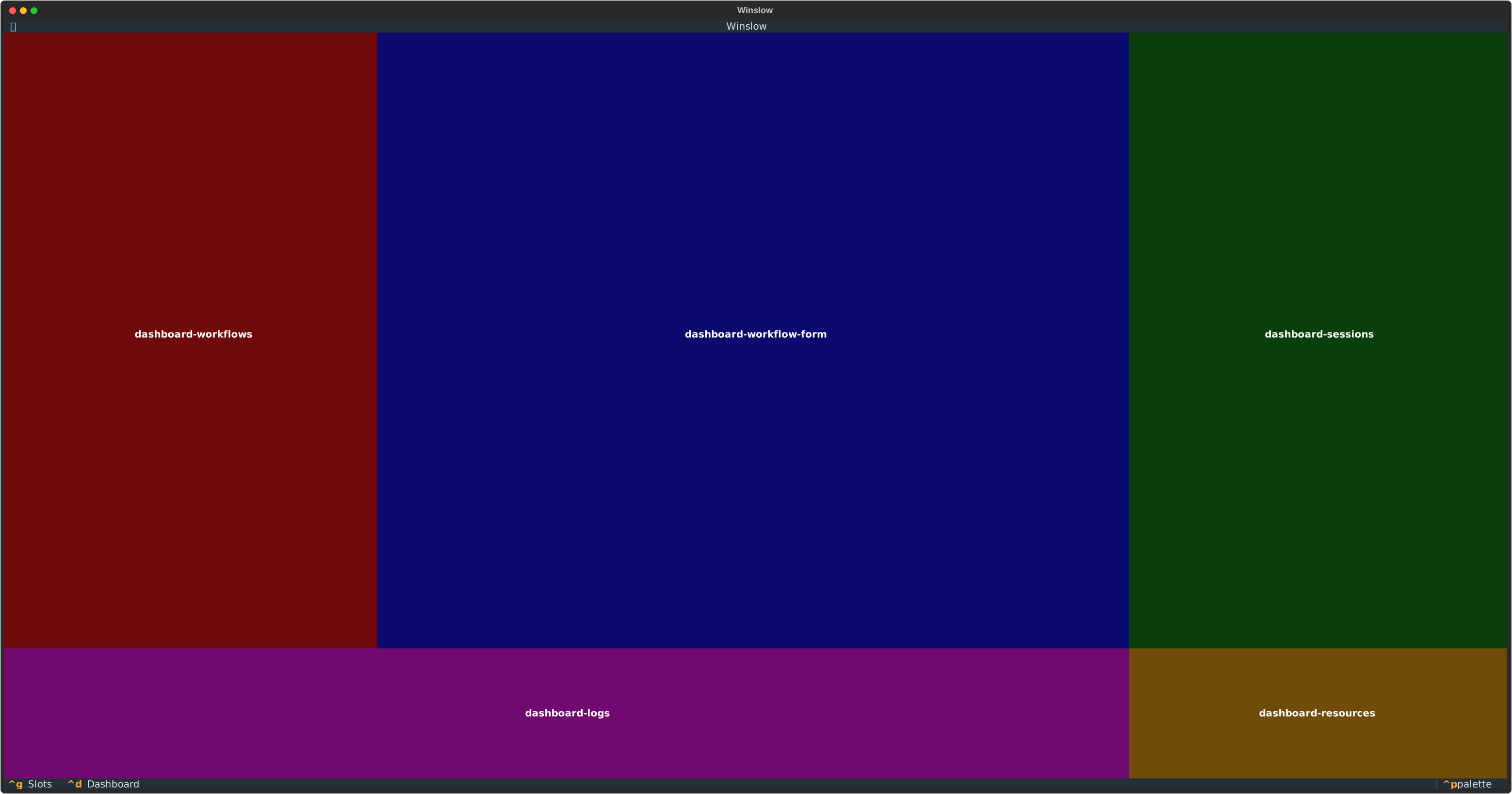
The dashboard slots and the built-in plugins in them:
| The slot | The built-in content |
|---|---|
DASHBOARD_WORKFLOWS |
The workflow selector. |
DASHBOARD_WORKFLOW_FORM |
The workflow form. |
DASHBOARD_SESSIONS |
The session list, with a History tab. |
DASHBOARD_LOGS |
The application logs. |
DASHBOARD_RESOURCES |
The system resources. |
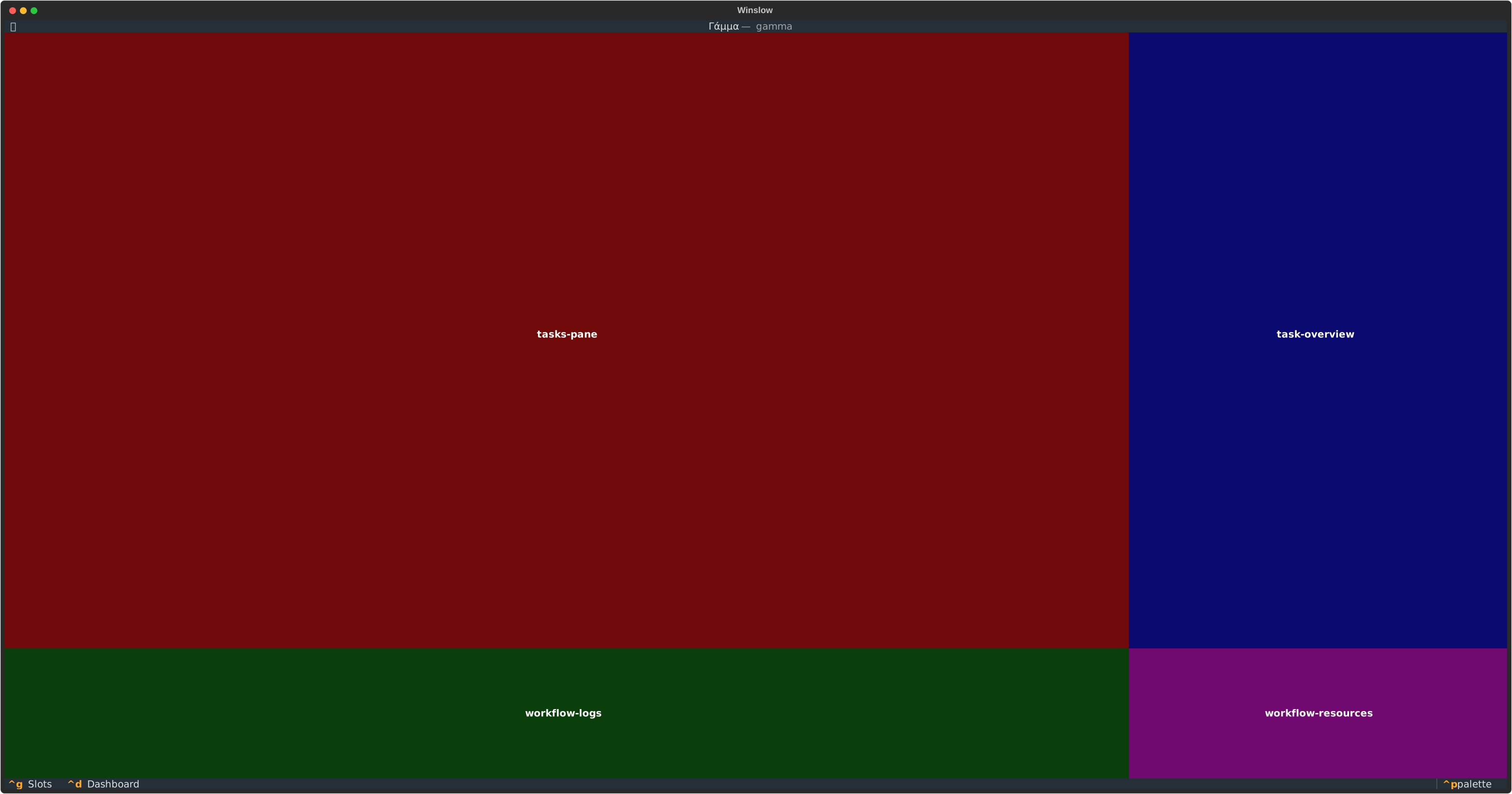
The workflow screen slots:
| The slot | The built-in content |
|---|---|
TASKS_PANE |
The task list, with a History tab. |
TASK_OVERVIEW |
The overview of the selected task. |
WORKFLOW_LOGS |
The session logs. |
WORKFLOW_RESOURCES |
The system resources. |
Two slots live in modals, and not on a screen: TASK_DETAIL fills the task info modal, and
WORKFLOW_CONFIRMATION fills the confirmation modal before a workflow starts.
Order the plugins in a slot
The priority value orders the plugins of one slot. A lower value comes first, and the first plugin is the
first tab. Each built-in plugin starts at 5, and the next one in the same slot is one higher. The values 0
to 4 are reserved for a plugin that must come before the built-in plugins:
class SampleDashboardPlugin(UIPlugin):
    slot = Slots.DASHBOARD_WORKFLOWS
    label = "Sample"
    priority = 6      # After the built-in workflow selector.
Two plugins with the same priority order by their plugin name. Declare a priority instead of depending on that order.
Replace a built-in plugin
The replace argument evicts another plugin and takes its place. The target is the qualified plugin name
(see The name of a plugin). A built-in plugin has the prefix builtin.
This example puts a mood face on the system resources pane, and keeps the built-in stat widgets:
from textual.widgets import Static

from winslow.ui.builtin_plugins.common.system_resources import (
    SystemStats,
    CpuStat,
    MemoryStat,
)
from winslow.ui.builtin_plugins.dashboard.resources import (
    DashboardSystemResourcesPlugin,
)


def _face(pct):
    if pct < 30:
        return "😊"
    if pct < 70:
        return "😰"
    return "😡"


class MoodSystemStats(SystemStats):
    def compose(self):
        yield Static(_face(0.0), id="mood-face")
        yield from super().compose()

    def on_mount(self):
        self.set_interval(2, self._update_mood)

    def _update_mood(self):
        cpu = self.query_one(CpuStat).percentage
        mem = self.query_one(MemoryStat).percentage
        self.query_one("#mood-face", Static).update(_face(max(cpu, mem)))


class ResourcesMoodPlugin(DashboardSystemResourcesPlugin):
    label = "System Mood"
    replace = "builtin.dashboard-system-resources-plugin"

    def create_widget(self, context):
        return MoodSystemStats()
The plugin subclasses the built-in plugin, so it inherits the slot of its target. A replacement that declares its own slot must declare the same slot as its target. A different slot is an error, because a replacement changes the content of a pane and not the layout of the screen.
A complete example
The winslow-sample-tui-plugin package holds the two plugins of this page:
winslow-sample-tui-plugin/
├── pyproject.toml
└── winslow_sample_tui_plugin/
    ├── __init__.py
    ├── dashboard.py     # adds a tab
    └── mood.py          # replaces the system resources pane
The pyproject.toml declares the entry points:
[project]
name = "winslow-sample-tui-plugin"
version = "0.1.0"
description = "Sample Winslow plugin: two UI plugins"
requires-python = ">=3.12"
dependencies = ["winslow"]

[build-system]
requires = ["uv_build>=0.11.32,<0.12.0"]
build-backend = "uv_build"

[tool.uv.build-backend]
module-root = ""

[project.entry-points."winslow.tui_plugins"]
winslow-sample-tui-plugin = "winslow_sample_tui_plugin"
Install the package into the workflow project. An editable install keeps a local plugin live while you work on it:
The command adds the dependency and a local source to the pyproject.toml of the project:
A plugin package can also add a command to the filter language (see Filter plugins).